



Skip to content

Feature

Download all your child’s photos, videos and voice notes.

Take a full copy of your child’s story whenever you like: every memory tagged with them, shared ones included, as the original files in folders by month, with voice notes beside their photos and captions as text. It’s on every plan, and it keeps working if you stop paying.

Download everything for one child: 1,284 memories and 31.6 GB, what the copy includes, and Prepare download.

When it helps

Everything that’s theirs comes with it.

  • A toddler in a rust-coloured top lies beside a sleeping newborn and holds the baby’s hand.

    Both children at once

    A memory tagged with two children is in each child’s download, so neither copy has gaps.

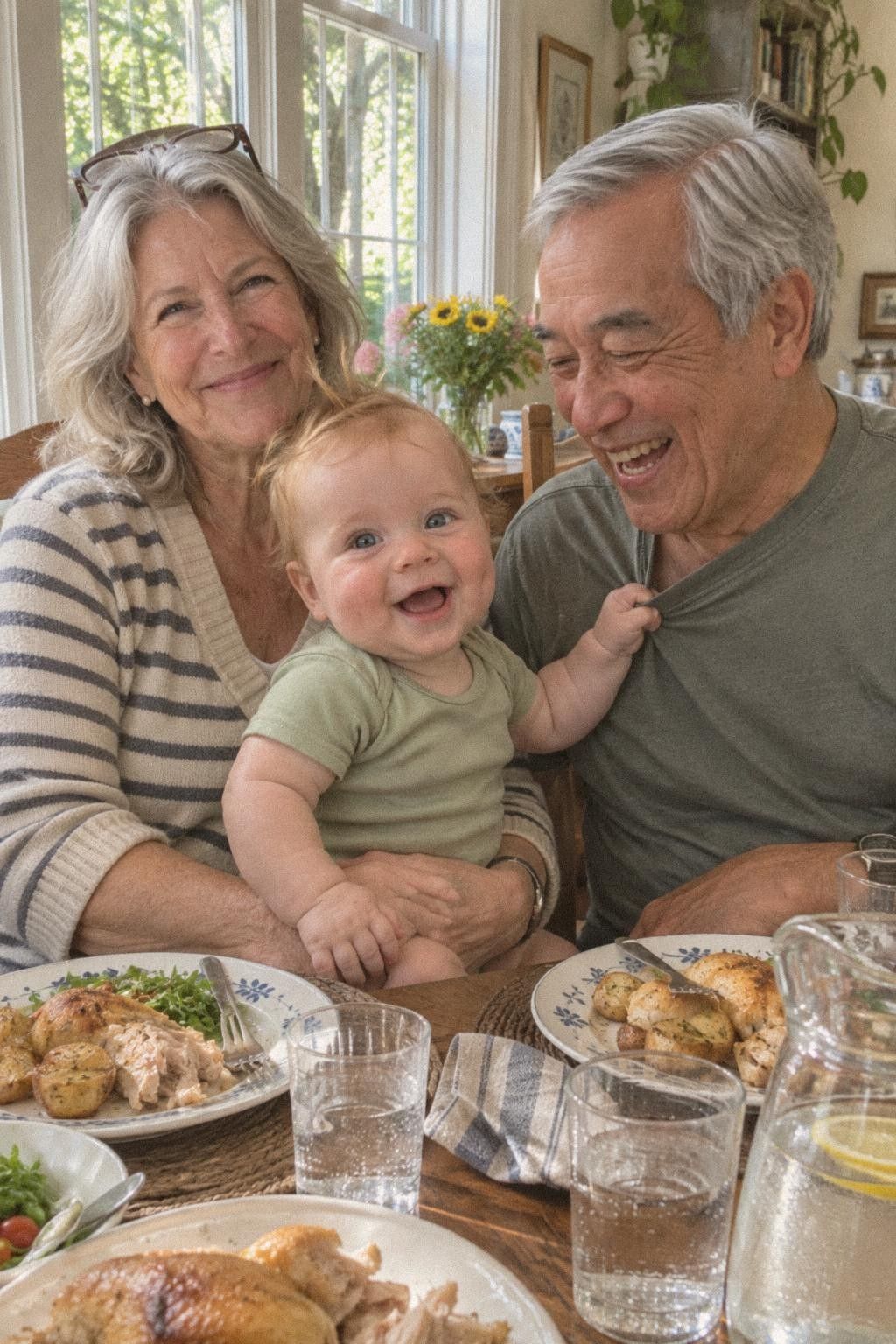
  • A grandmother holds a baby at the Sunday lunch table while the grandfather laughs.

    Photos from Grandma

    What grandparents and guests added, once it’s in the story, comes too, with their name in the index.

  • A barefoot baby walks across a living room rug toward his mother’s open hands.

    A first and its voice

    A first-steps photo and the voice note recorded on it are saved side by side, under one name.

How it works

Four steps to a full copy.

  1. Open Download everything

    In your child’s settings, tap Download everything. You see how many memories there are, how big they are and which months they cover.

  2. Press Prepare

    Tap Prepare download. TinyThen puts it together in the background. Close the app if you like; large stories can take an hour or more.

  3. Get an email

    We email you when it’s ready. Download the zip files within 7 days. Each part is under 4 GB, and together they hold everything.

  4. Unzip into one folder

    Unzip every part into the same folder. The year and month folders fill in together, with an index of every memory.

In the app

From the email to the folders.

  1. An email from TinyThen: everything of a child is ready, 1,284 memories and 31.6 GB in 8 parts to download by 19 November, with Go to the download.
    In your inboxThe email says how many memories, how big, and the day you can download it until.
  2. Download everything, ready: parts of under 4 GB by date, the first two marked Downloaded and part 3, November 2025 to February 2026, with Download.
    You, in TinyThenEach part has its own Download button, and a mark shows the parts you’ve already saved.
  3. Inside part 3: 2025 folders for November and December, and in 2026 January a first-steps photo and its voice note under the same name, a text file, and index.csv and README.txt.
    On your computerYear and month folders, files named by date and time, and an index of every memory with its caption.

What to know

What’s in it, and who can download.

  • Originals, unchanged

    Photos and videos come as they were uploaded, at full size. An original can still hold the location the phone saved.

  • Voice notes stay paired

    A voice note has the same name as its photo or video, so the two stay together in any folder.

  • Shared memories too

    A memory of several children is in each of their downloads. Drafts, trash and memories waiting for approval are left out.

  • Every plan, even after

    It’s on every plan and keeps working if your family stops paying. Only adding new memories stops.

  • Once a day, kept a week

    You can prepare a new copy of each child’s story once a day. A ready download is deleted after 7 days.

  • Parents only, by design

    Only parents can download everything. Family and guests save single originals only if you allow it.

  • Captions and words as text

    Captions, transcripts and who added each memory are in index.csv, and written memories are text files.

  • Parts under 4 GB

    A big story comes as several zip files of under 4 GB each, which most computers open without extra software.

In detail

What you get, and how it works.

Your child’s memories are yours. Download everything gives you a copy you can keep on your computer, a drive or another service, and open without TinyThen.

Downloading the parts

A ready copy shows as Everything, or as Part 1 of 8 and so on, each with the months it covers and its size. Every part is a zip file under 4 GB, so the zip tools built into most computers open it. A file is never split across parts, and a photo and its voice note always share a part.

Tap Download on each part. Each tap makes a fresh link that works for ten minutes, and download links are never sent by email. A Downloaded mark shows which parts you’ve saved on that device. You can download a part again for as long as the copy is kept.


Leo’s 1,284 memories in 8 parts of under 4 GB along his months, a photo and its voice note kept in one part, and a Download link that works for 10 minutes.

Folders and file names

Inside each zip, memories sit in folders by year and month, such as 2026, then 10 October. Each file is named by the date and time the memory happened, then a short code, so the files sort in order. Unzip every part into the same folder and the months fill in together.

A voice note has the same name as its photo or video. Voice recordings sit in the same folders, named the same way. Written memories become text files with the question they answer, the words, who wrote them and the date. Files come exactly as they were added, so an iPhone photo stays a HEIC file and a video stays an MP4 or MOV.

A file’s path taken apart: the year and month folders, the day and time it happened, a short code and its own format, with its voice note under the same name.

The index and the README

Every part also holds index.csv, a list of every memory, oldest first. It opens in Excel, Numbers or Google Sheets. Its columns are the part, date, time, type, the question it answers, caption, transcript, author, albums, first, style and file names. Memories from guests show the name they gave, marked as a guest.

README.txt explains what’s inside and which months each part covers. If a file couldn’t be included, for example a voice note still being processed, the README lists it under NOT INCLUDED. When parents have recorded your child’s height and weight, growth.csv adds them, with your child’s age on each day.

index.csv with a date, type, caption, author and first for each memory, one added by a guest, and README.txt listing the parts and a voice note not included.

What’s included, and what isn’t

A copy holds every memory tagged with that child, shared ones included. A photo of two children is in each child’s download, so neither copy has gaps. Memories added by grandparents, family and guests come too, once they’re in your child’s story.

Memories waiting in To review, unfinished drafts and anything in Recently deleted are left out. Albums don’t get folders of their own, because a memory can be in several. The index lists the albums each memory is in. Digital books aren’t included as books, but every memory in them is.

What a copy of Leo holds: memories with Brooks, ones Nana added and ones from a guest link; left out: To review, drafts and Recently deleted; albums and books as notes.

Limits and timing

You can prepare a new copy of each child’s story once a day, for all parents together. The page tells you from when. If preparing fails, nothing is kept and it doesn’t count, so you can tap Try again.

A ready copy is kept for 7 days, then deleted. The page says the day it ends, and afterwards when it was deleted, so you know to prepare a fresh one. For now, a child’s story over 64 GB can’t be prepared in one go. The page asks you to contact us, and we help you get a copy. If a child is deleted, their prepared copy is deleted at once.

A copy ready on 12 November is kept until 19 November, a new copy of each child once a day, and Try again when preparing fails.

Preparing a copy

Download everything is in each child’s settings. It shows how many memories your child has, how much space they take and which months they cover, with a list of what a copy includes. Tap Prepare download.

TinyThen puts the copy together in the background and shows a progress bar while it works. You can leave the page or close the app. Large stories can take an hour or more. When it’s ready, we email the parent who asked, whatever their email settings. The copy holds the memories in your child’s story when you tapped Prepare download. Anything added after that goes in the next copy.

Who can download

Only parents can download everything, and any parent can prepare a copy of any child’s story. Family members and people with a viewing link can’t. You can let a family member or a viewing link save single originals, and turn that off again whenever you like.

Parents can also save a few originals without a full copy. Open a memory and choose Download, or select several in the timeline and tap Download. Turning downloads off for someone removes their download buttons. It can’t stop screenshots.

On every plan, and after

Download everything is part of every plan. If your family stops paying, everything stays viewable and Download everything keeps working. Only adding new memories stops until you pay again or choose another plan.

Originals are kept unchanged, so a photo can still hold the place it was taken and other details the camera saved. Previews people see in TinyThen have those removed. Before you share an original somewhere else, our guide shows how to remove location from photos.

Who can download

Viewing and saving are separate.

You choose, person by person and link by link, who may save originals. Only parents can download everything.

Viewing and saving are separate.
TopicParentsFamily membersViewing links
Download everythingYes, for each child, whenever you like.No.No.
Single originalsAlways.Only if a parent allows it for that person.Only if a parent allows it for that link.
With downloads offParents can always download.They can view but not save originals. Screenshots can’t be stopped.People with the link can view but not save originals. Screenshots can’t be stopped.

Questions

Questions

Something else? Write to hello@tinythen.com.

Does Download everything cost extra?

No. It’s on every plan, and it keeps working if your family stops paying. You keep viewing everything too; only adding new memories stops until you pay again.

What do I get?

Zip files. Inside, the original photos, videos and voice notes sit in folders by year and month, written memories are text files, and index.csv lists every memory with its date, caption and who added it. Download everything, step by step shows each screen.

Can I download just a few photos?

Yes. Parents can open any memory and choose Download for its original, or select several in the timeline and download them together. Download everything is for a full copy of a child’s story.

Can grandparents download everything?

No. Only parents can. You can let a family member or a viewing link save single originals, and turn that off again whenever you like.

Are photos other people added included?

Yes, once they’re in your child’s story. Memories waiting in To review, unfinished drafts and anything in Recently deleted are left out.

Do the files keep location data?

They can. Originals are kept unchanged, so a photo may still hold where it was taken. Previews shared in TinyThen have location and other embedded data removed.

Is there a size limit?

Each part stays under 4 GB, so the zip tools built into most computers open it. For now, a child’s story over 64 GB can’t be prepared in one go; the app asks you to contact us, and we help you get a copy.

How often can I download everything?

You can prepare a new copy of each child’s story once a day. Each ready copy is kept for 7 days, so you have a week to save every part.

Can I open the files without TinyThen?

Yes. They’re ordinary photo, video, audio and text files in plain folders, and index.csv opens in Excel, Numbers or Google Sheets. You can move them to a computer, a drive or another photo service.

Keep reading

Start their story with the family.

Join the waitlist for 20% off your first year. We’ll write once, when the 30-day trial is ready for your family.

TinyThen is in development. We’ll email once to confirm and send your code, then only when the trial is ready. Leave any time.